We’re halfway through the year, and there is no better time to talk about messaging stacks that are in the need of some serious love.
Many engagement strategies are a bit like a boat with a slow leak; their performance erodes just enough to remain alive month after month, until before you know it you're bailing water faster than you're actually moving forward. Obviously this puts you in the danger zone as a lifecycle marketer who’s judged on activation, LTV, and maximizing mobile user retention. Now it’s Q3 is here and you’re feeling it before you can even name it: numbers that are just a little softer than they should be, with nothing obvious to point to.
Let’s take 15 minutes to trace that back to an actual cause. Below are five checks worth running today, before that leaky boat becomes a shipwreck.
1. Check the distribution, not the average
Most audits stop at "average messages per week per user," and that number almost always looks fine. The problem hides a little deeper: your most-engaged 10% of subscribers are often getting hit by every single journey, every broadcast, and every trigger campaign that exists because they're the ones who qualify for everything. Meanwhile a big chunk of your list gets almost nothing, which is its own missed opportunity.
What to do: Pull a histogram of messages-received-per-subscriber over the last 30 days, not a single average. If your top decile is getting 3-4x the volume of your median subscriber, that's very likely where your fatigue-driven unsubscribes and opt-outs are actually coming from, even if your aggregate metrics look healthy.
2. Find your zombie segments
Segments don't expire, so they don't tell you when they've gone stale. A segment built around "users who viewed the app in the last 7 days" behaves completely differently six months later if your product added a new onboarding flow, changed an event name, or shipped a feature that changed what "active" means. The segment still runs, but it’s targeting a completely different population than the one someone designed it for.
What to do: List every segment that hasn't been referenced by a new campaign or journey in the last 90 days. For each one, ask: does this definition still match what I'd build if I were creating it today? A surprising number of teams find segments still firing into live journeys that everyone assumed had been retired.
3. Check how fast you can act on a retention signal
Every lifecycle team already has the data to see engagement slipping before it turns into churn. A common bottleneck is the distance between noticing something and actually shipping a fix. That gap tends to get measured in days, sometimes a sprint, by which point the moment that mattered has already passed.
For example, you notice a spike in opt-outs followed right after a specific journey step, but by the time anyone traces it back to that step and fixes the trigger, another few thousand users have already hit the same message and turned notifications off for good.
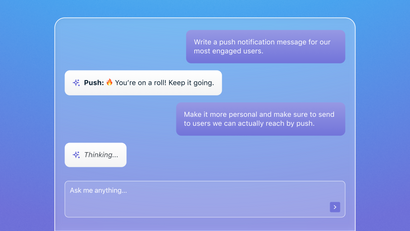
A growing number of AI assistants can act directly on your messaging platform instead of just reporting on it, performing tasks like checking a segment's real size, pulling a subscriber's history, adjusting a template, all through emerging protocols like MCP, which let an AI client call a platform's tools the same way a person would.
What to do: Time your own loop. Next time you spot a genuine engagement or retention signal, track how long it takes from noticing it to it being live. If that number is measured in days, that's a process problem that can be fixed almost instantaneously today.
For a sense of what that looks like in practice: OneSignal's own MCP server already shows this pattern forming. The most common calls aren't dramatic automations, they're simply marketers asking an assistant to pull message history, check a segment, or look up a template, in the moment, instead of routing it through a dashboard and a ticket. It's the same instinct behind this whole post: catching small things while they're still small, just done conversationally instead of by hand.
4. Look for broken personalization fallbacks
This one's sneaky because it doesn't nessecarily throw an error… it just slowly degrades. A template built around {{first_name}} or a dynamic product recommendation looks great in preview, using your own test data. Then it ships, hits a user with a null property, and instead of failing loudly, it renders the fallback text: "Hey there," or a blank content block. Nobody notices because there's no alert for "this message technically sent successfully but read like it came from a robot."
What to do: Spot-check your five highest-volume templates against real (not test) user records, specifically ones with missing or incomplete profile data. If your fallback text reads as generic or awkward, that's the version a meaningful slice of your audience is actually seeing.
5. Re-check quiet hours against where your users actually are
If your send-time and quiet-hours logic was set up when your app was mostly a US audience, and you've since grown internationally (or shifted acquisition spend), that logic is aging out from under you without anyone changing a setting.
What to do: Compare your current top-10 countries or timezones by active users against whatever list your send-time logic was originally built around. Mismatches here show up as "why are our late-night engagement numbers so weird." And they're an easy, boring fix once you spot them.
A new lease on your life(cycle) is here
The idea behind OneSignal AI and the MCP server is not to hand lifecycle marketers one more system to learn, it's the opposite: ask the platform for what you need in plain language, and get an answer or an action back immediately. That's the actual bet OneSignal is making: a small team keeping its messaging stack healthy shouldn't need the headcount of a much bigger one to do it. If that sounds useful for your own stack, it's free to try.
Get Started for Free